

KNIME Workflow Example for Credit Scoring
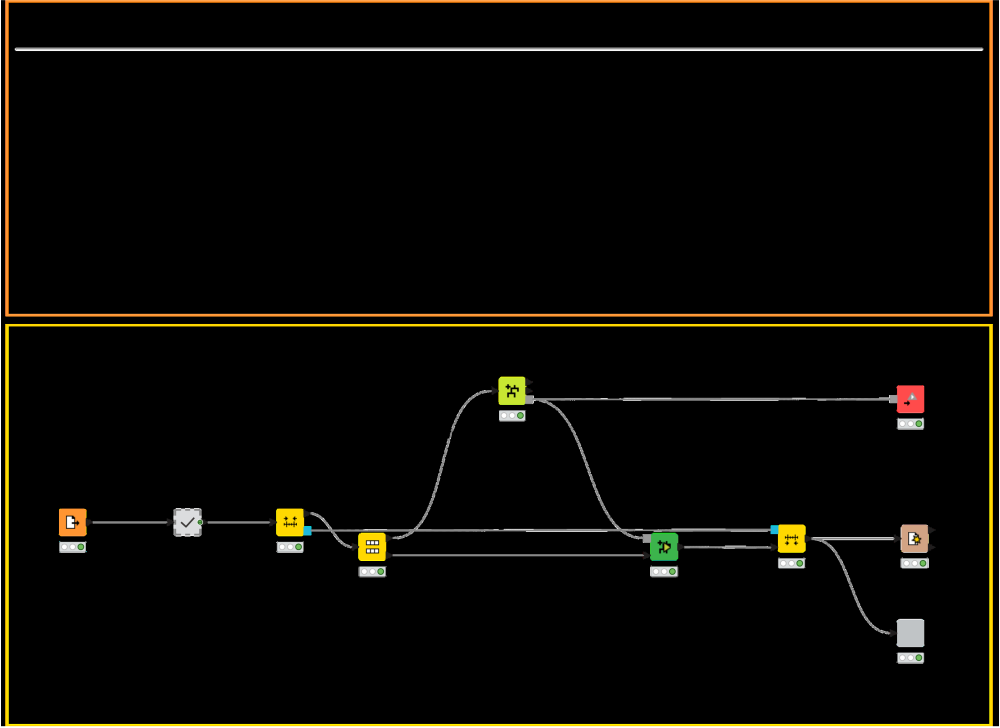
This example workflow walks through a simple but complete credit scoring process using Machine Learning:
- Data access and preprocessing
- Normalization of numeric variables
- Classification using Random Forest
- Evaluation using ROC Curve
Why use KNIME for Credit Scoring
What is credit scoring?
Credit scoring is the process of estimating how likely a borrower is to repay a loan. This involves training a classification model on past credit data to predict the risk of default.
Why does it matter?
Credit scores help financial institutions make informed lending decisions. A good model minimizes risk, improves approval accuracy, and supports compliance with regulatory expectations for transparency and fairness.
Typical challenges
- Preparing heterogeneous or incomplete customer data
- Selecting models that balance predictive accuracy and interpretability
- Handling class imbalance between defaults and non-defaults
- Making models explainable to non-technical users and auditors
Benefits of using KNIME
- Visual workflows for the entire process from reading and cleaning data to model training and deployment, no programming needed
- Transparent modeling with visual workflows makes it easier to explain predictions
- Schedule and automate the process, making it easy to integrate scoring into daily operations
How to use KNIME for Credit Scoring
Data Access
Import historical credit records through KNIME’s File Reader, CSV Reader, Excel Reader, or DB Connector nodes. KNIME supports connections to over 300 different data sources.
Data Validation and Pre-processing
Leverage the Missing Value and Data Explorer nodes to audit data quality, detect and address gaps, and examine the distribution of each feature. Use the Normalizer or Math Formula nodes to transform and scale numeric variables.
Model Training and Prediction
Train a transparent model with the Decision Tree Learner node, or opt for the Random Forest Learner node, and then predict using the Decision Tree Predictor or Random Forest Predictor node.
Performance Evaluation and Visualization
Review model effectiveness with the Confusion Matrix and ROC Curve, and examine key metrics such as accuracy, precision, recall, and threshold settings provided by the Scorer node, and then visualize it using the relevant KNIME visualization nodes.